![[2026 New] CNC Router Masuter Pro Max with Nema23 Closed Loop Stepper Motor Upgrade Kit](http://www.foxalien.com/cdn/shop/files/Untitled_design_7_9e32c0a4-2cd3-4ace-b70d-164be9aea203_2400x.png?v=1790234127)
![[2026 New] CNC Router Masuter Pro Max 2x2 with 1.5KW VFD Spindle Bundle Kit](http://www.foxalien.com/cdn/shop/files/Untitled_design_8_ac4b2f88-80da-4245-a434-9403a44cb230_2400x.png?v=1790236890)


![[2026 New] CNC Router Machine XE-Ultra Core with 1.5KW VFD Spindle Bundle Kit](http://www.foxalien.com/cdn/shop/files/6_db56cb29-ba63-4f08-8eb8-174de1311e22_2400x.jpg?v=1768896055)
![[2026 New] CNC Router Machine XE-Ultra Core with Hybrid Table Bundle Kit](http://www.foxalien.com/cdn/shop/files/52_2400x.jpg?v=1770628625)
![[2026 New] CNC Router Machine XE-Ultra Core with FA710 Trimmer Router Bundle Kit](http://www.foxalien.com/cdn/shop/files/single_2400x.jpg?v=1768897070)
![[2026 New] CNC Router Machine XE-Ultra Core](http://www.foxalien.com/cdn/shop/files/Untitled_1500x1500px_80da4a18-19af-40b4-862e-e0c7f815dbf8_2400x.png?v=1768890896)
![[2025 New] CNC Router Machine XE-Ultra with 1.5KW VFD Spindle Bundle Kit](http://www.foxalien.com/cdn/shop/files/VFD_Bundle_2400x.jpg?v=1757734438)
![[2025 New] CNC Router Machine XE-Ultra with Hybrid Table Bundle Kit](http://www.foxalien.com/cdn/shop/files/Untitled_design_1_ad7b4885-5e40-4b88-a937-4c0a7a485ede_2400x.png?v=1757758904)
![[2025 New] CNC Router Machine XE-Ultra with FA710 Trimmer Router Bundle Kit](http://www.foxalien.com/cdn/shop/files/FA710_Bundle_2400x.jpg?v=1757648673)


![[Final Sale] CNC Router Machine Vasto V1](http://www.foxalien.com/cdn/shop/products/8_ae9b055e-902f-455d-b505-b8e858109075_2400x.png?v=1641806703)
![[Final Sale] CNC Router Machine CL-4x4](http://www.foxalien.com/cdn/shop/files/Untitleddesign_dcc9347f-1f2f-4ea5-a804-b8778b280b61_2400x.png?v=1695097134)
![[Final Sale] CNC Router Machine Vasto XXL V1](http://www.foxalien.com/cdn/shop/products/VastoXXL_2400x.png?v=1670324182)
How to activate LE-4040 limit switch on Lasergrbl
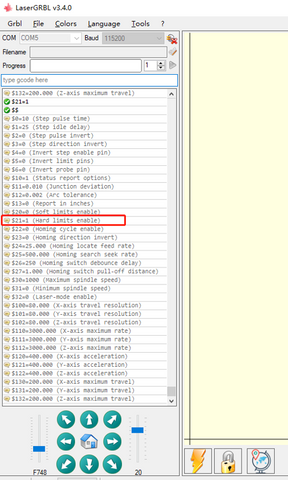
Step 1: Enter $$ in command window, click Enter.
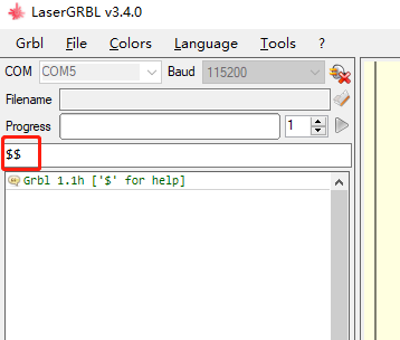
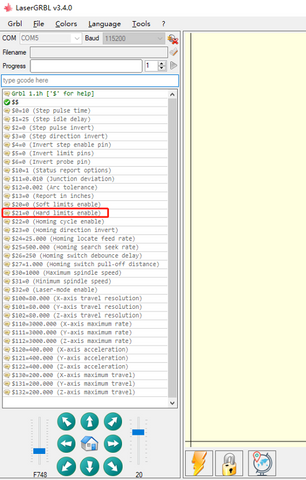
Step 2: Find the default limit switch setting: $21=0, change it to $21=1 to activate limit switch function.
Step 3: Enter command $21=1, click Enter
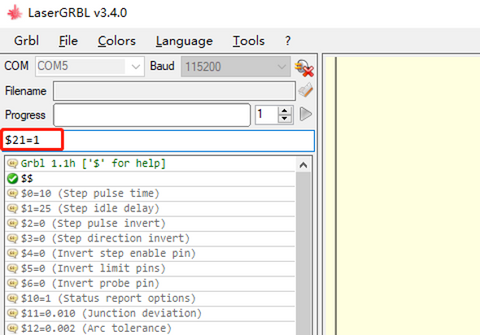
Limit switch is enabled.
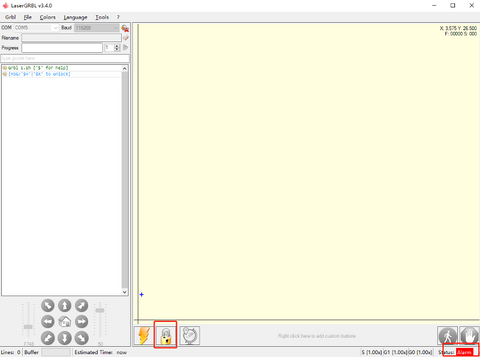
Step 4: When limit switch is triggered, it will show warning (as the picture shows) and needs to reset to continue. Click to reset.
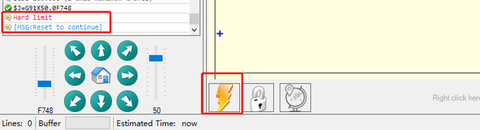
Step 5: The status on the right bottom corner will show Alarm. Click to unlock. Then it can work as normal.